Grime Time
ASMR Cleaning Game
About Grime Time
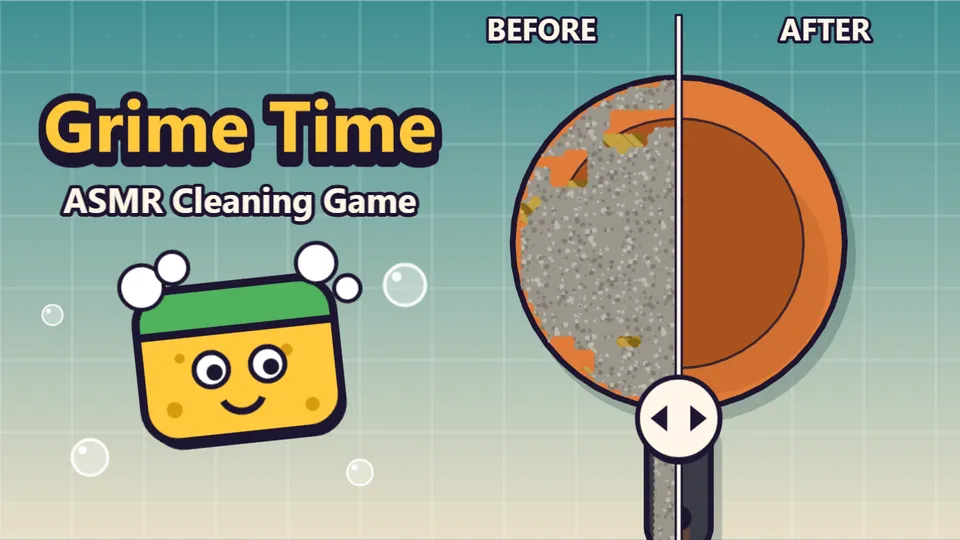
Grime Time is a calm, satisfying cleaning game. A grimy object slides onto the worktop, you pick a tool, and you drag. The dirt comes off under your finger with a soft scrub and the real colour shows through: first a corner, then a stripe, then the whole thing.
Every object hides two to four layers. Dust comes off with anything, mud rinses away under the pressure washer, grease needs the scraper, and rust, limescale and moss each want their own approach. Pick the right tool and a layer clears with a bright ding. Pick the wrong one and it only smears, so there is no harm done, just a moment lost.
The end is the best part. Once you reach 95% the last spots glow, the final half percent snaps clean with a sparkle wipe, and a before and after slider lets you admire the job. It is made for screen recording.
Fifty objects wait in five sets, from a kitchen mug to a garden gnome and a retro console, and each set brings something new. Come back every day for Daily Grime, one object for everyone, and share your time and streak.
How to play
- Drag across the grimy object to scrub. The layer under your finger comes off and the ring at the top fills up.
- Each grime needs the right tool. A tick on a tool button means it works on the spot under your cursor; the wrong tool only smears.
- Some grime takes more than one pass: limescale wants the Sponge twice and then the Scraper, stickers peel from their curled corner.
- Finish with the Polish in long strokes. From 95% the last spots glow, and at 99.5% the object snaps clean.
- Slide the before and after view, collect up to three sparkles, and move on to the next object.
Controls
| Input | What it does |
|---|---|
| Touch | Drag one finger to scrub; tap a tool in the bar at the bottom to switch |
| Mouse | Hold the left button and drag to scrub; the wheel or the tool bar switches tools |
| Keyboard | Arrows or WASD move the brush, hold Space to scrub, 1 to 4 pick a tool, Tab cycles tools |
| Keyboard | H shows every spot when you are stuck, P or Esc pauses, M mutes, F goes fullscreen |
Tips
- Match the tool to the grime: the Scraper takes grease in one pass where the Sponge needs three.
- The Washer is fast on mud and the only thing that moves moss. Its tank refills by itself, and an empty washer wakes up again after a few seconds, so switch tools while it recovers.
- Polish only counts on long strokes. Sweep across the object instead of dabbing.
- Fewer tool switches and less scrubbing over clean spots mean a better Daily score.
FAQ
Can I get stuck?
No. From 95% the remaining spots glow, after 20 seconds without progress you can show every spot for free, and the last half percent snaps clean on its own. There is no fail state and no timer you can lose to.
How do sparkles and sets work?
Finish under par for three sparkles, within one and a half times par for two, and any finish earns one. Clean 8 of the 10 objects in a set to open the next: Kitchen, Garage, Bathroom, Garden and Oddities. Cleaned objects can be replayed in Zen, with no clock.
How does Daily Grime work?
Everyone cleans the same object each UTC day, with every tool and an unlimited Washer tank. Your score starts at 3,000 and loses a point per second, five per tool switch and two per wasted second. Your first finish goes on the leaderboard, and a Daily you leave picks up where you stopped. One finished before midnight UTC counts for your streak.
Are there ads?
Never while you clean, never in the Daily or a Zen replay, and never in your first two objects. A short ad may play when you press Next object, at most every other object and 2.5 minutes apart. You can choose to watch one to refill the Washer tank or to show every spot, but both also happen for free if you wait a little.
Can I turn the scrub sound up and the rest down?
Yes. Settings has a separate Scrub volume, plus options to hide the percentage or the timer and to reduce motion.
What does Share copy?
The Daily number, the grime layers, your sparkles, time and streak, and a link. Never your name or any id.
Design notes
Cleaning apps are known for an ad every few seconds and for a final hunt for invisible crumbs. Grime Time shows you the last spots, snaps the final half percent clean, and keeps ads between objects only. Every grime has its own pattern, so tools never depend on telling colours apart.
Changelog
- Released: 50 objects in five sets, four tools, the before and after slider, Zen replays and Daily Grime with streaks and sharing.